The New Top HDTV - The Amazon Fire TV
All-New Element 43-Inch 4K Ultra HD Smart LED TV - Fire TV Edition
- Fire TV Edition is a smart TV experience that seamlessly integrates your favorite streaming and live over-the-air content on a unified home screen (HD antenna required).
- Experience true-to-life 4K UHD picture quality with over 8 million pixels for stunning clarity, deep contrast, and brilliant colors on a direct-lit LED screen with minimal motion blur. Refresh Rate: 60 Hz (Native), 120 Hz (Effective).
- The Fire TV experience is built in so you can enjoy over 15,000 channels, apps, and Alexa skills. Get universal search results across over 140 channels and apps including Netflix, Hulu, HBO NOW, SHOWTIME, STARZ, and Prime Video.
- The included Voice Remote with Alexa allows you to control live TV playback, launch apps, search for TV shows, play music, switch inputs, control smart home devices, and much more.
- Prime members get unlimited access to Prime Video, featuring thousands of movies and TV episodes at no additional cost.
- Dimensions (W x H x D): TV without stand: 38” x 22.2” x 3.6”, TV with stand: 38” x 24” x 10.1”
- Multiple device input/output options: 4 HDMI 2.0 including 1 with ARC, 1 USB 2.0, 1 USB 3.0, SD card, Ethernet, composite/component, headphone, optical audio out.

HDTV Ratings - Top 10 HDTV's
Below are the top 10 HDTVs as rated by various HDTV authorities (PCMAG, Amazon,HDTV.fm) The HDTVs listed are some of the top rated high definition displays as reviewed by buyers and users.
HDTV Ratings #10 - Samsung LN-T5265F LCD

System Specs
Screen Size: 52 inches
Type: LCD TV, LCD Monitor, HDTV
Native Resolution: 1920 x 1080
Supported EDTV and HDTV Resolutions (HD Ready): 480p, 720i, 1080i, 480i, 1080p
Aspect Ratio: 16:9
Video Inputs: Component, Composite, HDMI, RF, S-Video
PC Interfaces: Analog VGA, HDMI
Built-in TV Tuner: NTSC, ATSC
Brightness (Max): 439.5 cd/m^2
Max PC Resolution: 1920 x 1080 pixels
USB Ports: 1
Analog Inputs (Samsung LN-T5265F)

The A/V connections on the LN-T5265F include three HDMI ports (one front-accessible on the left-hand side of the LCD)
Two component video inputs,
VGA port for PC use, and two RF inputs for digital tuning of over-the-air and cable TV signals
Side accessible inputs (Samsung LN-T5265F)

The LN-T5265F includes a side-accessible USB port for accessing music and pictures stored on portable media.
On Screen Menu (Samsung LN-T5265F)

Full set of white-balance controls that are used to optimize the high and low portions of the gray scale to ensure they are relatively color-neutral.
________________________________________________________________________________
HDTV Ratings #9 - Westinghouse Digital TX-47F430S LCD HDTV

System Specs
Screen Size: 47 inches
Type: LCD Monitor, HDTV
Native Resolution: 1920 x 1080
Supported EDTV and HDTV Resolutions (HD Ready): 480p, 720p, 1080i, 480i, 1080p
Aspect Ratio: 16:9
Video Inputs: Component, Composite, HDMI, RF, S-Video
PC Interfaces: Analog VGA, HDMI
Built-in TV Tuner: NTSC, ATSC
Rated Maximum Viewing Angle: Horizontal: 176 degrees
Rated Maximum Viewing Angle: Vertical : 176 degrees
Brightness (Max): 0.47 cd/m^2
Max PC Resolution: 1920 x 1080 pixels
Analog Inputs ( Westinghouse Digital TX 47F430S )

The Westinghouse TX-47F430S, offers four HDMI ports, as well as an impressive number of analog and digital video inputs.
More Inputs ( Westinghouse Digital TX 47F430S )

All of the TX-47F430S' audio and video (A/V) ports are located on the rear of the TV, along the sides of a central column that's about 10.5 inches wide and protrudes about 2.0 inches from the back of the television.
The TX-47F430S's selection of 1080p-compatible inputs includes, in addition to the four HDMI ports, two component video inputs and a VGA port for use with a personal computer.
On Screen Menus ( Westinghouse Digital TX 47F430S )

More On Screen Menus ( Westinghouse Digital TX 47F430S )

Two 10 watt speakers are concealed within the TV's frame along the bottom edge and fire downwards.
The TV's speaker output delivered ample volume for a large room, and a 15-watt integrated subwoofer helped balance the system's otherwise bright sound.
More On Screen Menus ( Westinghouse Digital TX 47F430S )

HDTV Ratings #8 - Mitsubishi WD-65833 DLP Rear Projection HDTV
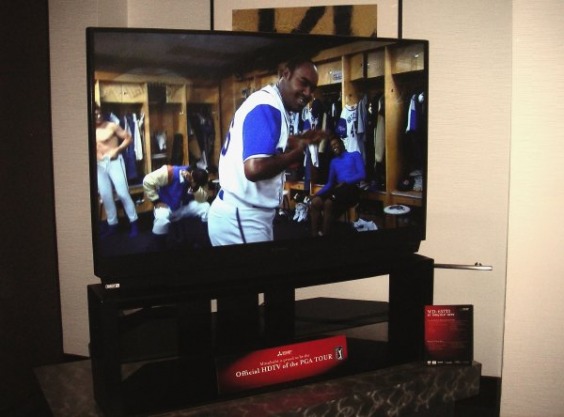
System Specs
Screen Size: 65 inches
Type: Rear Projection TV, HDTV
Rear Projection Type: DLP
Native Resolution: 1920 x 1080
Supported EDTV and HDTV Resolutions (HD Ready): 480p, 720i, 1080i, 480i, 1080p
Aspect Ratio: 16:9
Video Inputs: Component, Composite, HDMI, RF, S-Video, i.Link/FireWire
PC Interfaces: HDMI
Built-in TV Tuner: NTSC, ATSC
Brightness (Max): 218.2 cd/m^2
Max PC Resolution: 1920 x 1080 pixels
USB Ports: 1
Analog Inputs ( Mitsubishi WD-65833 )

Included are three HDMI ports;
Two component video inputs;
Two RF ports for cable and terrestrial broadcast reception, respectively;
Two IEEE 1394 ports for use with high-end set-top boxes and digital video cameras;
An RS-232C port; and even a "3D-glasses emitter" connector for syncing compatible liquid-crystal shutter glasses.
More Inputs ( Mitsubishi WD-65833 )

A fold-down door on the front of the TV conceals an additional component video input, as well as a fourth HDMI port. Portable storage devices can be connected to a front-accessible USB port for easy viewing of digital images on the Mitsubishi's big screen.
On Screen Menu ( Mitsubishi WD-65833 )

The WD-65833 comes with plenty of helpful menu-based tips, and, as a result, is very easy to set up and use. For example, attaching an A/V device to the TV's component or HDMI inputs triggered a menu pop-up that prompts to select an input name from a preset list of devices, as well as to configure the TV's remote to learn device commands. Another useful menu option allowes to edit the list of active inputs.
________________________________________________________________________________
HDTV Ratings #7 - Sony KDS-55A2020 SXRD LCoS Rear Projection

System Specs
Screen Size: 55 inches
Type: Rear Projection TV, HDTV
Rear Projection Type: LCoS, SXRD
Native Resolution: 1920 x 1080
Supported EDTV and HDTV Resolutions (HD Ready): 480p, 720p, 1080i, 480i, 1080p
Aspect Ratio: 16:9
Video Inputs: Component, Composite, HDMI, RF, S-Video
PC Interfaces: Analog VGA, HDMI
Built-in TV Tuner: NTSC, ATSC
Brightness (Max): 421.1 cd/m^2
Max PC Resolution: 1920 x 1080 pixels
Analog Inputs ( Sony KDS-55A2020 SXRD )

The 55A2020's main selection of A/V ports faces outwards and sits on the rear of the TV. This array includes two HDMI inputs, two component-video inputs, a VGA port for PC use, and two RF inputs for cable and terrestrial TV reception, respectively.
More Inputs ( Sony KDS-55A2020 SXRD )

Here you see the 2 HDMI Ports
Front Inputs ( Sony KDS-55A2020 SXRD )

Concealed behind a fold-down door on the front of the TV is an additional component-video input as well as a set of on-display controls.
On Screen Menu ( Sony KDS-55A2020 SXRD )

The 55A2020 provides customizable video input labels up to ten characters long, and the color of the on-screen menus can be changed to any one of six hues.
________________________________________________________________________________
HDTV Ratings #6 Vizio P50 HDM Plasma HDTV

System Specs
Screen Size: 50 inches
Type: Plasma, HDTV
Native Resolution: 1366 x 768
Supported EDTV and HDTV Resolutions (HD Ready): 480p, 720p, 1080i, 480i
Pixel Pitch: 0.81 mm
Aspect Ratio: 16:9
Video Inputs: Composite, HDMI, S-Video
PC Interfaces: Analog VGA
Rated Maximum Viewing Angle: Horizontal: 170 degrees
Rated Maximum Viewing Angle: Vertical : 170 degrees
Brightness (Max): 1000 cd/m^2
Analog Inputs ( Vizio P50 HDM )

All A/V inputs face down and are centered on the back along the lower edge. Input connections include two for HDMI, a pair for component video, and one VGA for use with PCs.
Analog Inputs Up Close ( Vizio P50 HDM )

A closer look at the inputs as shows in the above screen shot
Side View ( Vizio P50 HDM )

Attractive design and good image quality when using 720p and PC video sources. Its lack of a digital tuner and its scaling issues with 1080i content make it best suited for use with a set-top box that provides content scaled to the display's preferred 720p resolution. But perhaps what's most important is that Vizio has delivered a good 50-inch plasma monitor that sets the bar for the features and performance you should expect from future low-priced challengers.
________________________________________________________________________
HDTV Ratings #5 - Sony Bravia KDL-40XBR2

System Specs
Screen Size: 40 inches
Type: LCD TV, HDTV
Supported EDTV and HDTV Resolutions (HD Ready): 480p, 720p, 1080i, 480i, 1080p
Aspect Ratio: 16:9
Video Inputs: Component, Composite, HDMI, S-Video Built-in TV Tuner: NTSC,
ATSC Rated Maximum Viewing Angle: Horizontal: 178 degrees
Rated Maximum Viewing Angle: Vertical : 178 degrees
Max PC Resolution: 1920 x 1080 pixels
Analog Inputs ( Sony Bravia KDL-40XBR2 )

Two component-video inputs on the rear of the TV are compatible with 720p/1080i and lesser video formats. There is also a PC RGB input to plug in your media center pc or any PC.
More Inputs ( Sony Bravia KDL-40XBR2 )

The 40XBR2 has three HDMI inputs—one front-accessible on the left side of the display. Both the HDMI inputs and the VGA input support 1080p/60-Hz video signals.
Side Inputs ( Sony Bravia KDL- 40XBR2 )

The final HDMI input along with the RCA Video and Audio inputs on the side.
On Screen Menu ( Sony Bravia KDL- 40XBR2 )

It provides user-accessible advanced picture controls that professional calibrators and videophiles can use to optimize image quality. My final results were very good. It has excellent color tracking (minimal variations in color from dark to light intensities) and a color gamut that was a near-perfect match of the gamut specified for HD video.
________________________________________________________________________________
HDTV Ratings #4 - Sharp AQUOS LC-52D92U LCD HDTV

System Specs
Screen Size: 52 inches
Type: LCD TV, HDTV
Native Resolution: 1920 x 1080
Supported EDTV and HDTV Resolutions (HD Ready): 480p, 720p, 1080i, 480i
Aspect Ratio: 16:9
Video Inputs: Component, Composite, DVI, HDMI, RF, S-Video
PC Interfaces: Dual-mode (DVI-I), HDMI
Built-in TV Tuner: NTSC, ATSC
Rated Maximum Viewing Angle: Horizontal: 176 degrees
Rated Maximum Viewing Angle: Vertical : 176 degrees
Brightness (Max): 268.8 cd/m^2
Max PC Resolution: 1920 x 1080 pixels
Analog Inputs ( Sharp AQUOS LC-52D92U )

All video connections on the LC-52D92U are located on the rear of the TV. Two component-video inputs. An RS-232 port is available for use with programmable home-theater control systems.
Digital Inputs ( Sharp AQUOS LC-52D92U )

In addition to three HDMI inputs, it also provides a DVI-I connection for PC use, an RF input for cable/antenna reception. In addition to supporting 1080p/60-Hz input, all of the LC-52D92U's digital video inputs incorporate HDCP for use with protected video sources such as cable and satellite TV receivers as well as HD DVD and Blu-ray players.
On Screen Menu ( Sharp AQUOS LC-52D92U )

All video inputs feature independent picture controls, including picture-size modes that can completely eliminate image overscan with HD sources. For example, viewing 1080i video using the TV's "Dot by Dot" mode produced exceptionally clear and detailed imagery.
The Sharp's useful zoom function was ideal for upscaling widescreen video with a 4:3 aspect ratio in order to fill the screen without distorting the picture. This is great for those widescreen TV shows that have yet to make the leap to high definition.
HDTV Ratings #3 - Samsung HP-S4273 Plasma HDTV

System Specs
Screen Size: 42 inches
Type: Plasma, HDTV
Native Resolution: 1024 x 768
Supported EDTV and HDTV Resolutions (HD Ready): 480p, 720p, 1080i, 480i
Aspect Ratio: 16:9
Video Inputs: Component, Composite, HDMI, RF, S-Video
PC Interfaces: Analog VGA
Built-in TV Tuner: NTSC, ATSC, CableCard
Brightness (Max): 108.7 cd/m^2
Max PC Resolution: 1360 x 768 pixels
USB Ports: 1
analog Inputs(Samsung HP-S4273 )

More than 2.5 times as many pixels as most 42-inch high-definition plasma televisions.
Easy to use multimedia file support and fantastic contrast.
2 HDMI inputs, a VGA port, and two component-video inputs.
A CableCARD slot and individual RF inputs for antenna and cable tuning.
Memory Slots and other Inputs (Samsung HP-S4273 )

There is a USB port and two flash memory card slots that provide easy access to digital images and music using the TV's integrated player software.
The memory card formats supported by the readers include SD, MMC, XD, CF, Memory Stick, and Memory Stick Pro.
Side accessible inputs (Samsung HP-S4273 )

On-display controls and a set of standard-definition A/V inputs are front-accessible along the right side of the TV.
On Screen Menu (Samsung HP-S4273 )

The HP-S4273's menu options offer basic picture controls and a few display presets that are useful for quickly optimizing the set's image quality for various lighting conditions.
________________________________________________________________________________
HDTV Ratings #2 - Toshiba 37HL67 REGZA LCD HDTV

System Specs
Screen Size: 37 inches
Type: LCD TV, HDTV
Native Resolution: 1366 x 768
Supported EDTV and HDTV Resolutions (HD Ready): 480p, 720p, 1080i, 480i, 1080p
Aspect Ratio: 16:9
Video Inputs: Component, Composite, HDMI, RF, S-Video
PC Interfaces: Analog VGA, HDMI
Built-in TV Tuner: NTSC, ATSC
Rated Maximum Viewing Angle: Horizontal: 178 degrees
Rated Maximum Viewing Angle: Vertical : 178 degrees
Brightness (Max): 324.6 cd/m^2
Max PC Resolution: 1920 x 1080 pixels
Analog and Digital Inputs ( Toshiba 37HL67 REGZA )

The A/V connections on the rear of the display include two component-video inputs, a VGA input for PC use, the PC port works amazingly well for Satellite TV for PC, a single RF input for digital cable or broadcast reception, and three HDMI inputs.
By the way with Satellite TV for PC you can watch over 3000 stations for a small one time fee! Instant download.... download here
On Screen Menu - Video ( Toshiba 37HL67 REGZA )

The Toshiba's useful selection of picture-size settings includes a mode that eliminates overscan with HD video.
The Toshiba has an average dark measurement of 0.15 Cd/m2 with a contrast ratio of 722:1—a very good result for a TV configured for dark-room, eye-friendly viewing.
On Screen Menu - Audio ( Toshiba 37HL67 REGZA )

By default, the Toshiba enables several SRS Labs' WOW audio enhancements that added convincing bass and improved positioning.
________________________________________________________________________________
HDTV Ratings #1 Sharp LC-32D40U LCD HDTV

System Specs
Screen Size: 32 inches
Type: LCD TV, HDTV
Native Resolution: 1366 x 768
Supported EDTV and HDTV Resolutions (HD Ready): 480p, 720p, 1080i, 480i
Aspect Ratio: 16:9
Video Inputs: Component, Composite, HDMI
PC Interfaces: HDMI
Built-in TV Tuner: NTSC, ATSC
Rated Maximum Viewing Angle: Horizontal: 176 degrees
Rated Maximum Viewing Angle: Vertical : 176 degrees
Brightness (Max): 356.4 cd/m^2
Max PC Resolution: 1280 x 720 pixels
Analog Inputs ( Sharp LC-32D40U )

The LC-32D40U provides a near-ideal set of video inputs, including two HDMI ports, two component-video connections, and a single RF input that feeds the TV's analog (NTSC), digital (ATSC), and Clear QAM (unencrypted digital cable) tuners.
Some Digital Inputs ( Sharp LC-32D40U )

The LC-32D40U's native resolution is 1,366 by 768 pixels, which slightly exceeds the resolution of a 720p HD signal. The display lacks a DVI or VGA input for PC use, but PC resolutions up to 1,280-by-720 (720p) are supported via the HDMI inputs.
On Screen Menu ( Sharp LC-32D40U )

The LC-32D40U provides a standard set of picture controls that include color-temperature presets and a backlight-level adjustment. Unfortunately, the TV's standard menu screens don't provide advanced color settings, but professional calibrators and videophiles can access these controls in its hidden service menus. Impressively, the LC-32D40U's picture was almost perfectly calibrated right out of the box.
Perhaps most critical, the LC-32D40U revealed more fine details in dark scenes. The Sharp has superior representation of color and dark detail. For example, while watching a San Francisco Giants baseball game in HD, the grass that glowed like Astroturf on the Westinghouse TV appeared realistic and detailed viewed on the LC-32D40U.
Looking at some carefully chosen scenes from the DVD movies: (Raiders of the Lost Ark, The Fifth Element, and Gladiator) the LC-32D40U performed well. The significant film grain of Raiders and Gladiator was managed with finesse, without overly softening the image, and colors appeared natural. During the part of the "Well of Souls" scene in Raiders to check for motion smearing on LCDs, and the LC-32D40U minimized this annoying artifact better than the Westinghouse did. With a great picture, good-sounding speakers, and a stylish design, the LC-32D40U is a treat for the senses.
